Elevating Your Presentations with the Belizeh Google Slide Template
Creating a compelling presentation can feel like a daunting task. You need compelling visuals, a clear structure, and a professional aesthetic to truly engage your audience. Often, this means hours of laborious work aligning elements, sourcing graphics, and trying to maintain a consistent look across dozens of slides. The Belizeh Google Slide Template is designed to eliminate that friction, providing a robust foundation for anyone who needs to communicate ideas with clarity and style.
A Comprehensive Toolkit for Modern Presenters
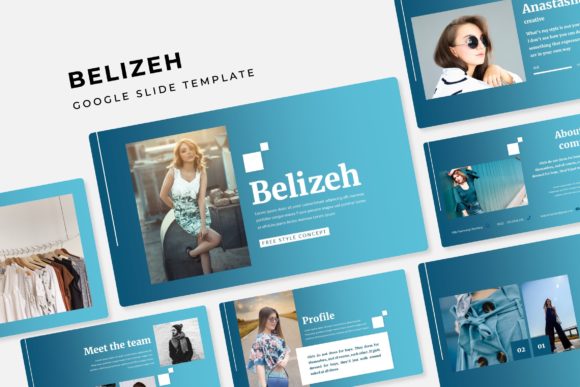
What sets the Belizeh template apart is its sheer completeness. It’s not a single file but a comprehensive package built to adapt to your needs. The core offering includes 150 total slides, intelligently distributed across 5 premade colors. This means you get 30 distinct, fully-designed slides for each color variation. Whether your brand palette leans towards cool blues, energetic oranges, or professional neutrals, you have a ready-made set that maintains visual cohesion from the first slide to the last.
The Power of Structured Design: Master Slides & Sections
Built on a foundation of master slides, the Belizeh template ensures consistency. Changing a font or a background color on the master slide propagates throughout your presentation, saving you from tedious manual edits. This is crucial for maintaining a professional look. Furthermore, it includes dedicated section break slides. These act as visual chapter markers within your presentation, helping you structure longer talks into digestible parts and guiding your audience through your narrative flow.
For showcasing work or products, the included gallery and portfolio slides are invaluable. They provide elegant, pre-arranged layouts for images and descriptions, turning a simple image dump into a curated visual experience. This is perfect for design portfolios, product launches, case study presentations, or any scenario where visuals need to be the star.
Handcrafted Visuals and Effortless Editing
Beyond structure, the visual assets in the Belizeh Google Slide Template are crafted for impact. The package features a suite of handcrafted infographics in PowerPoint. These are not generic clip-art; they are custom illustrations designed to explain processes, showcase data, or highlight features in a more engaging way than simple bullet points. Complementing these are the pixel-perfect illustrations that add polish and thematic flair throughout the slides.
Perhaps one of the most practical features for everyday use is the resizable and editable graphic. Every design element is built to be manipulated. Combined with picture placeholder functionality that supports a simple drag and drop workflow, adding your own images becomes a matter of seconds. You don’t need advanced design skills to personalize the template fully. This makes it ideal for teams where multiple people might need to update or contribute to a presentation deck.
What You Actually Receive: The Complete Package
It’s important to understand exactly what’s included when you choose the Belizeh template. You receive 5 PPTX files – one for each color theme. Additionally, you get 5 PPTX widescreen files, ensuring your presentation looks perfect on modern projectors and screens without any awkward stretching or cropping. A readme first file guides you through setup, and because the template uses specific fonts to achieve its look, a free font download link is included for easy access.
A key note for users: all photographs or pictures used in the preview are not included. They are intended for illustration purposes only within the marketing previews. The template provides the placeholder frames, layouts, and graphic ecosystem, but you populate it with your own content, images, and data. This keeps the template flexible and legally clear for your commercial or personal use.
Fitting the Belizeh Template Into Your Workflow
How does this template fit into a real-world project? Consider a startup preparing for an investor pitch. They need a deck that is professional, visually confident, and clearly structured. Using one of the Belizeh template’s color schemes that matches their brand, they can quickly drop their logo into the master slide, use the infographics to explain their business model, employ the portfolio slides to showcase their prototype, and use section breaks to delineate the market analysis, the product, and the financials. The time saved on design allows them to focus on refining their message.
For educators or trainers, the template offers a way to create visually engaging lecture materials without starting from a blank canvas. The clear hierarchies and varied slide layouts help break down complex information. For marketing professionals, it’s a tool for creating client proposals, campaign reports, and social media strategy presentations that look polished and bespoke, even under tight deadlines.
Choosing the Right Presentation Template: Key Considerations
When evaluating any template, including the Belizeh Google Slide Template, several factors matter. First is adaptability. Can you easily change colors and fonts to suit your needs? Belizeh’s five color variants and editable master slides score highly here. Second is comprehensiveness. Does it offer enough slide types to cover the entire arc of a presentation? With 150 slides covering everything from titles to conclusions, infographics to galleries, it does.
Third is ease of use. Are the elements truly editable for someone with basic PowerPoint or Google Slides knowledge? The drag-drop placeholders and resizable graphics address this. Finally, consider the visual quality. Are the graphics modern, crisp, and professional? The handcrafted, pixel-perfect assets ensure the output looks designed, not templated. The Belizeh template is built to meet these practical benchmarks, making it a strong contender for anyone who regularly creates presentations.
In a landscape where communication is increasingly visual, the tools you use matter. A powerful template like Belizeh doesn’t just make your slides look better; it streamlines your process, reinforces your message with smart design, and ultimately lets you focus on what matters most – the content you’re presenting and the audience you’re engaging.