Elevate Your Ideas with the Manivangga Google Slide Template
Crafting a compelling presentation is often a bottleneck between a great idea and its successful realization. For professionals, educators, or entrepreneurs, the process can be time-consuming, draining creative energy away from the core message. The Manivangga Google Slide Template is designed to dismantle that bottleneck. It is a comprehensive presentation system, not just a set of slides, offering a structured, visually cohesive foundation upon which you can build your narrative with confidence and efficiency.
A Foundation for Clear and Consistent Communication
The cornerstone of any effective presentation is visual consistency. When slides haphazardly mix fonts, colors, and layouts, the audience's focus shifts from your content to the distracting inconsistencies. The Manivangga template solves this by being built on a system of Master Slides. This means every slide you create inherits a unified design framework—consistent typography, spacing, and graphical elements. This automatic coherence ensures your presentation looks professionally crafted from the first slide to the last, allowing you to concentrate solely on refining your message rather than fussing with alignment and formatting.
This is particularly crucial for recurring communications. Imagine a marketing team needing to produce monthly performance reports, or an educator preparing weekly lecture materials. With Manivangga, each new presentation starts from a trusted, uniform baseline, saving hours of repetitive design work and guaranteeing a recognizable brand or academic identity across all deliverables.
Streamlining the Creative Process with Flexible Design
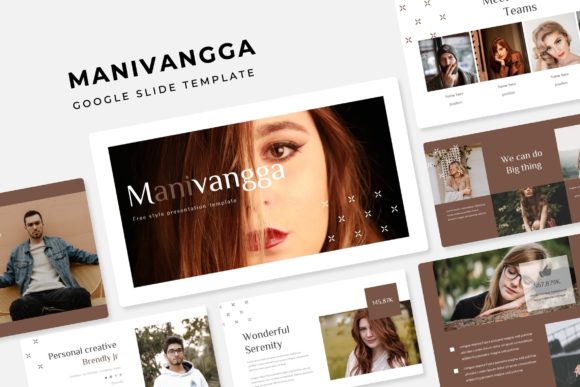
One of the most practical features of the Manivangga Google Slide Template is its inclusion of five distinct premade color variations. Each variant comes as a complete, standalone 30-slide deck. You aren't simply selecting a different accent color; you're choosing an entirely new atmosphere. A sleek dark theme might suit a corporate tech pitch, while a vibrant, light scheme could energize a creative portfolio review. This choice at the outset simplifies a critical decision, allowing you to match the visual tone to your presentation's purpose instantly.
Within these decks, the handcrafted, pixel-perfect infographics and illustrations are more than decoration. They are tools for explanation. A complex process or data relationship can be communicated quickly and clearly using a well-designed diagram. Because these graphics are resizable and editable directly in PowerPoint, you can adapt them to your specific data without needing advanced design skills. Similarly, the dedicated gallery and portfolio slides provide ready-made layouts for showcasing work, products, or team members, removing the struggle of arranging multiple images elegantly.
From Idea to Slide in Moments
The drag-and-drop picture placeholder functionality addresses a common, minor yet frequent frustration: inserting and cropping images. With designated placeholders, you can insert visuals directly into predefined, optimally framed areas. This feature alone accelerates the assembly of visual content, ensuring photographs and graphics integrate seamlessly into the overall design without manual resizing or alignment adjustments. It turns a technical step into a simple, almost intuitive action.
Who Stands to Gain the Most from This Template?
The versatility of the Manivangga Google Slide Template makes it a powerful asset for a wide range of users. Freelancers and small business owners, who often operate without a dedicated design team, will find it provides a professional-grade visual identity for client proposals, project updates, and service showcases. Bloggers and content creators can use it to transform blog posts or video scripts into structured, shareable presentation decks for social media or community talks.
Educators and trainers can build clear, engaging lecture materials and course summaries. Marketers can rapidly produce campaign briefs, social media reports, and product launch presentations. The inclusion of both standard and widescreen PPTX files ensures compatibility with various display setups, from laptop screens to conference room projectors. For anyone whose work involves regularly conveying information to an audience, this template acts as a reliable starting point that elevates quality and reduces production time.
Understanding the Scope and Practical Application
It is important to note what the Manivangga template includes and how to approach it. The package provides five PPTX files for the standard format and five for widescreen, each corresponding to one of the five color themes. The "Readme First" file and the provided free font download link are essential starting points. Following the instructions ensures the typography renders correctly, maintaining the intended design integrity. The template's 150 total slides offer a vast library of layouts—section breaks, title slides, comparison charts, quote slides, and more—so you can pick a suitable structure for each part of your narrative without designing it from scratch.
A key consideration is that the photographs shown in previews are for illustration only and are not included. This is standard for professional templates; your content will populate the slides. This means the final result is uniquely yours, built on a professional framework. The template gives you the architecture, you supply the story.
A Note on Creative Boundaries
While the Manivangga Google Slide Template offers immense flexibility within its system, it is a predefined design framework. For users seeking to create wildly avant-garde or highly niche artistic presentations that break conventional layouts, this template provides a professional baseline that can still be customized, but may require more significant modification. Its primary strength is in providing a robust, efficient, and polished path for business, educational, and professional communication. For most practical purposes, its structured variety is more liberating than limiting, as it eliminates countless minute design decisions.
Making Your Message the Focus
Ultimately, the value of any tool lies in the outcome it enables. Using the Manivangga Google Slide Template shifts your effort from how to present to what to present. The time saved on design logistics can be reinvested into researching your topic, refining your argument, or rehearsing your delivery. The professional polish it automatically applies enhances your credibility and helps your audience trust the information you are sharing. When your slides are clear, consistent, and visually supportive, your ideas stand at the center, communicated with the impact they deserve.
Whether you are pitching to investors, teaching a class, or reporting quarterly results, this template serves as a reliable partner in your process. It doesn't promise to do the work for you, but it ensures the foundation of your presentation is solid, allowing you to build something compelling upon it with greater speed and less friction. In a world where effective communication is vital, having such a resource at hand is not just a convenience; it is a strategic advantage for getting your ideas seen, understood, and remembered.