Unlocking the Power of Presentations with Amara Keynote Template
In today's fast-paced world, effective communication is more critical than ever. Whether you're presenting a business plan, pitching a new product, or sharing insights at a conference, the Amara Keynote Template offers a versatile and visually appealing solution to make your presentations stand out. This article delves into the features, benefits, and practical applications of the Amara template, helping you to create impactful and professional presentations.
Overview of Amara Keynote Template
The Amara Keynote Template is designed to cater to a wide range of presentation needs. With 150 total slides, it provides ample space for detailed content, making it ideal for both short and long presentations. The template is divided into 5 premade color variations, each offering 30 unique slides, ensuring that you can find the perfect look to match your brand or personal style.
Key Features and Benefits
- 150 Total Slides: Amara includes a comprehensive set of 150 slides, giving you the flexibility to cover all aspects of your presentation without the need for additional design work.
- 5 Premade Colors: Choose from 5 distinct color schemes, each meticulously crafted to enhance the visual appeal of your presentation. This variety allows you to align your presentation with your brand's identity or personal preference.
- Handcrafted Infographics: The template features handcrafted infographics, which are essential for presenting complex data in an easily digestible format. These infographics are not only visually engaging but also highly informative.
- Section Break Slides: To help structure your presentation, Amara includes section break slides. These breaks provide a natural pause, allowing your audience to absorb the information before moving on to the next topic.
- Gallery and Portfolio Slides: Showcase your work, projects, or products with the gallery and portfolio slides. These slides are perfect for highlighting key achievements and visuals, making your presentation more dynamic and engaging.
- Resizable and Editable Graphic Picture Placeholders: The template includes resizable and editable graphic picture placeholders, enabling you to drag and drop images seamlessly. This feature ensures that your visuals are always perfectly aligned and integrated into your presentation.
Master Slides and Customization
One of the standout features of the Amara Keynote Template is its reliance on master slides. Master slides allow for consistent and efficient customization across your entire presentation. By modifying a single master slide, you can apply changes to all related slides, saving you time and effort. This feature is particularly useful for maintaining a cohesive and professional look throughout your presentation.
Pixel-Perfect Illustrations
The Amara Keynote Template is known for its pixel-perfect illustrations, which add a touch of elegance and professionalism to your presentation. These illustrations are carefully designed to be visually appealing and to complement the overall aesthetic of the template. Whether you're using them to explain a concept, highlight a point, or simply to add a decorative element, these illustrations will enhance the quality of your presentation.
What’s Included in the Package
- 5 PPTX Files: The package includes 5 PPTX files, each corresponding to one of the 5 premade color variations. This allows you to choose the best color scheme for your presentation and start customizing immediately.
- 5 PPTX Widescreen Files: In addition to the standard PPTX files, the package also includes 5 PPTX widescreen files. These are ideal for modern widescreen displays, ensuring that your presentation looks great on any screen.
- Readme First Document: A comprehensive "Readme First" document is included, providing you with all the necessary information to get started. This document covers installation, customization, and usage tips, making it easy for even beginners to use the template effectively.
- Free Font Download Link: The template uses free fonts, and a download link is provided in the package. This ensures that you have access to the same fonts used in the template, maintaining the intended design and style.
Practical Considerations and Tips
When using the Amara Keynote Template, there are a few practical considerations to keep in mind. First, ensure that you have the latest version of Keynote installed to take full advantage of the template's features. Additionally, while the template comes with a variety of pre-designed slides, don't hesitate to customize them to better fit your specific needs. The template's flexibility allows you to add, remove, or modify elements as required.
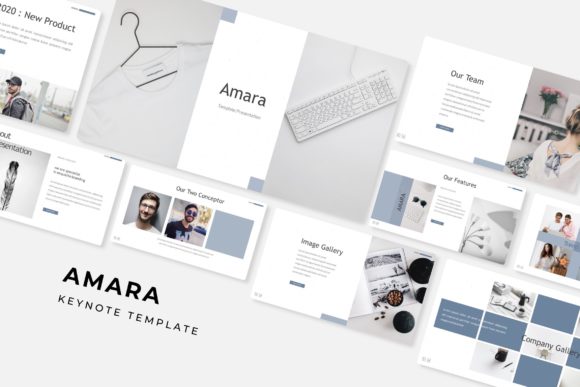
It's also important to note that all photographs or pictures used in the preview are not included in the template. They are intended for illustration purposes only. You can, however, easily replace these with your own images using the drag-and-drop functionality.
Integrating Amara into Your Workflow
The Amara Keynote Template is designed to seamlessly integrate into your existing workflow. Whether you're a seasoned presenter or a beginner, the template's user-friendly design and comprehensive features make it a valuable tool for creating high-quality presentations. By leveraging the template's pre-designed slides and customizable elements, you can save time and focus on delivering your message effectively.
Conclusion
The Amara Keynote Template is a powerful and versatile tool for anyone looking to create impactful and professional presentations. With its extensive range of features, including 150 total slides, 5 premade color variations, and handcrafted infographics, it offers everything you need to present your ideas with clarity and style. Whether you're using it for a business presentation, a project pitch, or an academic lecture, the Amara Keynote Template is a top choice for achieving your presentation goals.