The Visual Language of Modern Healthcare: Understanding Iconography in Digital Design
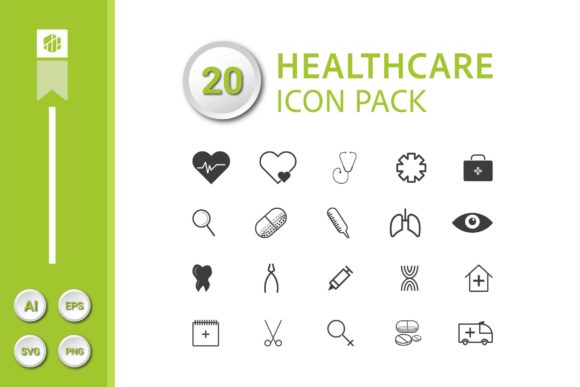
In the rapidly evolving landscape of healthcare communication, visual clarity is not just a luxury—it is a necessity. Whether you are navigating a patient portal on your smartphone, interpreting a clinical presentation, or designing an educational infographic, the icons you encounter play a crucial role in guiding understanding. A comprehensive collection of visual symbols, such as a well-crafted set of 20 healthcare icons, forms the backbone of this silent language. These icons translate complex medical concepts into simple, recognizable forms, bridging the gap between expert knowledge and public comprehension.
Why Minimalist Design Matters in Medical Interfaces
The shift towards minimalist, clean, and modern design in healthcare visuals is a response to a fundamental need: reducing cognitive load. In environments where stress and urgency are often high, such as hospital apps or emergency procedure guides, visual clutter can lead to confusion and errors. A minimalist icon, with its refined shapes and clear outlines, communicates its purpose instantly. For example, an icon for "pharmacy" that uses a simple, stylized mortar and pestle is more quickly recognized than a detailed, illustrative drawing of a drugstore interior. This design philosophy prioritizes function over ornament, ensuring that the icon serves its primary role as a signifier, not as decoration.
This approach is particularly evident in the design characteristics of contemporary icon packs. Each symbol is distilled to its essential visual components. A "heart monitor" icon might be represented by a clean line graph over a simplified heart shape, avoiding unnecessary technical details. This purity of form ensures that the icon remains effective at small sizes, such as on mobile app navigation bars, and at larger scales, such as on printed posters or presentation slides. The consistency in style across a full set—like a pack containing 20 distinct healthcare symbols—creates a cohesive visual system that users can learn and trust.
Core Applications Across Platforms and Media
The utility of a versatile healthcare icon pack extends far beyond a single medium. The same set of icons, provided in multiple file formats, can be deployed across an entire ecosystem of communication tools.
- Digital Platforms (Web & Mobile Apps): Here, icons are used for navigation, feature identification, and status indicators. An SVG icon for "telemedicine" or "appointment booking" within a patient app provides a crisp, scalable interface element that works on any screen resolution.
- Print Materials: For educational brochures, hospital wayfinding signage, or medical journal diagrams, high-resolution 300 DPI PNG files ensure print-quality clarity. A 256x256 pixel icon at this resolution retains its sharpness when incorporated into physical layouts.
- Presentations and Infographics: Professionals use these icons to visualize data and processes quickly. An EPS or AI file allows designers to edit colors or combine elements seamlessly within presentation software or graphic design tools, crafting custom infographics that explain treatment pathways or public health statistics.
- Integrated Projects: Hobbyists creating health-tracking tools, educators developing online courses, or business owners building wellness websites all benefit from a single, consistent visual source. Having 20 core healthcare concepts available as SVG, PNG, EPS, and AI files means the asset pack is ready for any project requirement, from a web icon font to a vinyl-cut sticker.
The Technical Foundation: File Formats and Specifications
Understanding the technical offerings of a professional icon pack is key to its effective implementation. Each file format serves a distinct purpose in the design workflow.
Scalable Vector Graphics (SVG) are arguably the most important for modern digital use. An SVG file is code-based, describing the icon's shapes with mathematical paths. This means it can be scaled to any size without losing quality, making it perfect for responsive websites that adapt to different devices. The 20 individual SVG files in a pack allow developers to embed each icon directly into code, often with the ability to dynamically change its color via CSS.
Encapsulated PostScript (EPS) and Adobe Illustrator (AI) files are the cornerstone for professional graphic design and print. They are vector-based, enabling infinite scaling and precise editing. The AI file, typically the master design file, allows a designer to deconstruct the icon, modify stroke weights, or extract individual elements. The EPS file, a standard interchange format, ensures the icon can be placed into layout programs like InDesign or QuarkXPress for high-quality print production.
Portable Network Graphics (PNG) files provide ready-to-use, rasterized images. The 20 PNG files at 256x256 pixels and 300 DPI are pre-rendered at a size and resolution suitable for both screen and print use. They offer transparency support, so the icon can be placed over any background. These are the "go-to" files for quick insertion into PowerPoint slides, WordPress sites, or simple mobile app prototypes where vector support might not be immediately available.
The total of 42 design files—covering AI, EPS, SVG, and PNG formats—represents a complete asset library. This multiplicity ensures that from the initial concept design in Illustrator (using the AI file) to the final deployment on a live website (using the SVG files), the visual integrity of the 20 healthcare icons remains intact.
Real-World Use Cases and Professional Impact
Consider the journey of a medical researcher preparing a conference presentation on cardiovascular health. They might use the "heart," "blood pressure," and "statistics" icons from the pack as visual anchors on each slide, creating a recognizable theme. The PNG files work perfectly in PowerPoint. Later, when publishing their findings on an institutional blog, they swap in the same icons as SVG files for better web performance. The consistency reinforces their brand and topic.
For a startup developing a mental wellness mobile app, the pack provides immediate, professional-grade assets. Icons for "therapy," "meditation," "sleep tracking," and "community support" can be integrated into the app's UI. Using the SVG files allows the development team to ensure the icons look perfect on every Android and iOS device screen size, while the PNGs serve as fallbacks or assets for promotional graphics.
Healthcare educators creating infographics for public health campaigns—about vaccination, nutrition, or exercise—benefit immensely. They can use the EPS files in their design software to build complex, layered graphics that combine icons with charts and text. The clean, modern style of the icons lends authority and clarity to the message, making complex information accessible to a broad audience.
Selecting and Implementing a Healthcare Icon Set
When choosing an icon pack for a healthcare-related project, several considerations beyond mere aesthetics come into play.
- Semantic Coverage: Does the set of 20 icons cover the necessary concepts for your project? A good pack should include fundamentals like medical staff (doctor, nurse), facilities (hospital, pharmacy), equipment (syringe, pill), actions (appointment, prescription), and statuses (healthy, emergency).
- Style Consistency: As mentioned, a minimalist and clean style across all icons is vital. Check that the line weights, corner radii, and visual metaphor approach are uniform. This consistency reduces user learning time and enhances the professional feel of your project.
- Technical Compatibility: Ensure the provided formats match your workflow. If your development team uses React for a web app, SVG files are essential. If your marketing department primarily uses Canva or similar tools, high-quality PNGs might be the primary need.
- Cultural and Contextual Relevance: Icons must be universally understood or easily learned. A "microscope" icon for laboratory work is standard; a more abstract symbol might require a label. The minimalist style often aids in this universality by stripping away culturally specific details.
Implementation starts with the master AI or EPS file. A designer might customize the color palette to align with an organization's brand—changing all icons to a specific shade of blue, for instance. From this edited vector file, new PNG and SVG exports can be generated at the required sizes. For digital projects, the 20 SVG files can be optimized, perhaps combined into a single sprite sheet or integrated as a custom icon font, to improve website loading performance.
The pixel dimension of 256x256 is a practical choice. It is large enough to allow for detail in the minimalist design and provides a solid base for scaling down to typical UI icon sizes (like 24px or 48px) and scaling up for hero images on websites. The 300 DPI specification for the raster PNG files guarantees that if those files are used in print, they will output sharply.
The Broader Trend: Visual Standardization in Health Tech
The availability of comprehensive, multi-format packs like this reflects a larger movement towards visual standardization in healthcare technology and communication. As digital health tools proliferate, users move between platforms—from a government health website to a private insurance portal to a personal fitness tracker. Familiar visual symbols, like a consistent "medical record" icon or a "vaccination" icon, create a sense of intuitive continuity across these experiences. This reduces anxiety and improves usability.
Furthermore, the clean, modern style aligns with contemporary design trends that emphasize user trust and transparency. In an sector where credibility is paramount, a professional, uncluttered visual interface subconsciously communicates competence and reliability. The icons are not just tools for navigation; they are components of the overall user experience that can affect perception and engagement.
For creators, educators, and business owners, investing in a robust asset pack is not merely a graphic design decision. It is an investment in clear communication. It provides the visual vocabulary needed to talk about health topics effectively in today's multi-platform world. Whether those 20 healthcare icons end up guiding a patient through a mobile app, illustrating a key point in a printed brochure, or highlighting a trend in a research presentation, their design ensures the message is delivered with clarity, speed, and visual harmony.