Medicx: The Medical Google Slides Template for Clearer Communication
If you've ever needed to present medical information, you know the challenge. Data needs to be precise, explanations must be clear, and the overall look needs to be professional enough to command attention yet simple enough to be understood. Designing such a presentation from scratch can consume hours you don’t have. This is precisely where Google Slides - Medicx becomes a vital tool. It’s a specialized presentation template designed for the medical and health sector, built within Google Slides for accessibility and ease of use.
Think of it not just as a set of slides, but as a structured starting point. Whether you’re a researcher sharing findings, a startup pitching a health tech innovation, or an educator explaining a complex process, Medicx provides a visual framework that aligns with the seriousness and clarity your content demands.
Where and Why This Template Makes a Difference
The application of Google Slides - Medicx stretches far beyond a single “medical” category. Its real value emerges in specific situations where clear, trustworthy communication is paramount.
A medical consultant preparing a report for a non-technical board of directors might use it to transform dense statistical outcomes into digestible infographics. A freelance health writer could employ it to create a compelling pitch deck for a new publication series. Even a university student presenting their thesis on public health trends would benefit from the template’s inherent structure, allowing them to focus on their research rather than slide design.
The common thread in all these use cases is time and credibility. You’re not a graphic designer; you’re a professional with information to share. Using a template like Medicx allows you to bypass the design anxiety and start with a visually coherent foundation, ensuring your audience focuses on your message, not your formatting.
Real Scenarios for Real Users
Let’s look at some concrete examples.
A small biotech startup is seeking seed funding. Their science is sound, but their initial PowerPoint slides are a mix of cluttered text and inconsistent charts. They download Medicx. Suddenly, they have a clean, professional deck with a logical flow: a master slide for company vision, perfectly designed slides for their data, and placeholder sections ready for their unique product images. The template doesn’t create their story, but it presents it with the polish investors expect, turning a technical explanation into a confident pitch.
An independent fitness coach and blogger wants to offer online workshops. She needs to explain anatomy, workout physiology, and nutrition plans in a webinar. Using generic slides would undermine her authority. With Medicx, she accesses slides with a clean, health-oriented aesthetic. The handcrafted infographics are perfect for illustrating muscle groups or metabolic pathways. She drags-and-drops her own photos into the picture placeholders. Now, her paid webinar looks like a premium product, elevating her brand and helping her clients learn more effectively.
Even in education, a high school teacher creating a unit on epidemiology can use Medicx. The pixel-perfect illustrations and resizable graphics help visualize concepts like virus transmission or vaccination rates far better than text alone. The template’s seriousness lends weight to the subject matter, engaging students with a presentation that feels authentic to the field they’re studying.
What to Consider Before Using Medicx
While Google Slides - Medicx is designed to be adaptable, it’s wise to consider a few things to ensure it’s the right fit for your project.
First, assess your content volume and structure. The template comes with 35 slides, which is ample for most presentations, but if your talk is extremely brief or extraordinarily long, you’ll need to adjust accordingly. The “easy customizable contents” feature means you can add, remove, or rearrange slides, but the core design language is medical and clean. If your topic is purely financial or artistic, the aesthetic might feel slightly mismatched, though its professional core could still work.
Second, consider your image resources. The template includes picture placeholders for drag-and-drop simplicity, but the demo images from Unsplash, Pixabay, and Pexels are not included. You’ll need to supply your own photographs, diagrams, or logos. This is actually a benefit—it forces you to personalize the presentation—but it requires you to have those assets ready.
Finally, understand the technical environment. This is a Google Slides template. It works seamlessly within that free, collaborative platform. If your workflow or organization is deeply entrenched in Microsoft PowerPoint, you might face a minor adjustment. However, the principles of clear medical communication remain the same regardless of the software.
Connecting Features to Real Outcomes
The listed features aren’t just a checklist; they enable specific, practical outcomes for the user.
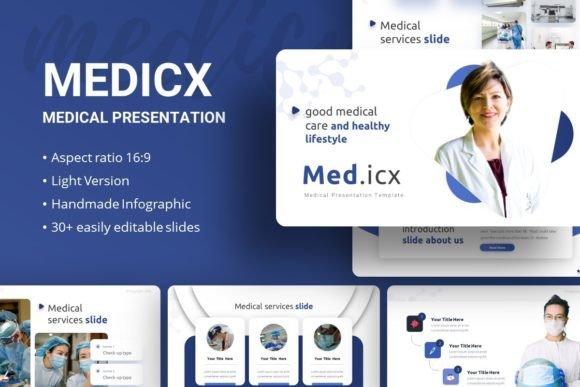
Handcrafted Infographics: This means you don’t have to build complex charts from scratch. For a pharmacist presenting new drug compliance data, these pre-made, editable infographics can be tailored in minutes to show percentages, timelines, or hierarchies, making the data instantly understandable.
All Graphics Resizable and Editable: A corporate trainer in a healthcare company can take the template’s icons and scale them to fit a slide about different departments, then change their color to match the company’s brand guidelines. The template provides the components, not restrictions.
Based on Master Slides: This ensures consistency. When a researcher is adding last-minute slides the night before a conference, each new slide automatically follows the same font scheme (using Roboto and Ubuntu) and layout structure. The presentation looks unified and professional, even under time pressure.
The Documentation File included is often overlooked. For a first-time user or a team sharing the template, this file explains how to manipulate the slides efficiently, reducing the learning curve and preventing design missteps.
The Broad Benefit: From Personal Portfolio to Professional Pitch
The versatility of Google Slides - Medicx is its strength. Its core design is medical, but its application is about clear, authoritative communication. A medical student could use it for their personal academic portfolio, showcasing their projects and papers. A creative agency specializing in health brand marketing could adopt it as their standard pitch deck template for all client proposals, ensuring a consistent and industry-relevant look.
In essence, it serves anyone who needs to talk about health, science, wellness, or medicine with clarity and impact. It turns the task of slide creation from a design problem into a content-focused activity. You spend your time refining your message, finding the right data, and crafting your narrative, while the template handles the visual coherence and baseline professionalism.
Before you download or use any template, ask yourself: is my primary challenge the content, or the container? If you have the content but struggle with the container—the clear, compelling, and credible presentation of that content—then Google Slides - Medicx offers a ready-made solution. It allows you to enter the room, or share the screen, with a visual foundation that already speaks to the seriousness of your field, letting you focus on what matters most: what you have to say.