Cromoshom: A Versatile Presentation Template for Modern Projects
In a world where a presentation can make or break a pitch, campaign, or idea, your slides need to do more than just convey information. They must tell a story, build trust, and leave a lasting impression. The Cromoshom Power Point Template is designed specifically for that mission. It’s not just a collection of slides; it’s a comprehensive framework for creating polished, professional, and visually compelling presentations with efficiency and style.
A Template Built for Flexibility and Visual Impact
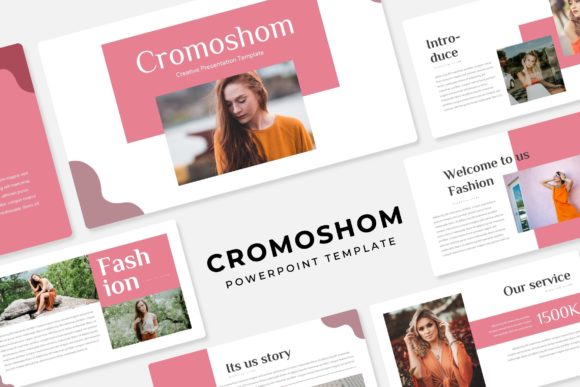
At its core, Cromoshom is a premium presentation template that prioritizes clean design and practical utility. Its visual characteristics lean towards a modern, structured aesthetic, utilizing pixel-perfect illustrations and handcrafted infographics. The personality is professional yet approachable, avoiding overly cold corporate clichés while maintaining a level of sophistication that suits serious projects.
The template’s overall appeal lies in its thoughtful architecture. Built on a system of Master Slides, it ensures consistency across your entire deck. Every element, from text boxes to graphic placeholders, is precisely aligned, allowing you to maintain a cohesive look without manual tweaking. This foundation is critical for establishing a strong visual hierarchy, guiding your audience’s attention seamlessly from key points to supporting data.
Where Cromoshom Shines: From Boardrooms to Creative Portfolios
The versatility of the Cromoshom Power Point Template makes it a valuable asset across a wide spectrum of users. Designers and brand strategists can leverage it to present brand identity concepts, mood boards, and campaign rollouts with a template that feels custom-built. The included gallery and portfolio slides are perfectly suited for showcasing work, making it ideal for creative agencies and freelancers.
For marketers, entrepreneurs, and small business owners, the template’s 150 total slides—organized into 5 premade color variations with 30 slides each—provide an incredible starting point for investor pitches, product launches, and annual reports. The ability to switch between five distinct color palettes allows you to match the tone of your brand or the mood of your presentation instantly, enhancing brand perception and consistency.
Content creators, bloggers, and publishers will find the structured yet editable layout ideal for crafting webinar slides, online course materials, or visual supplements for articles. The resizable and editable graphic picture placeholder system, where you can simply drag and drop your images, removes technical friction and lets you focus on your narrative.
Key Features That Empower Your Process
Understanding the specifics helps you gauge its fit for your workflow. The package includes 5 PPTX files for standard screens and 5 PPTX files for widescreen formats, covering most presentation scenarios. The handcrafted infographics in the PowerPoint section break slides are particularly valuable. They offer a way to visually segment different parts of your talk—transitioning from problem to solution, or from data to action—without relying on bland “Part 2” titles.
All illustrations and graphic elements are editable. You can change colors, resize components, and reposition items directly within PowerPoint, granting you control without needing external design software. This is crucial for maintaining professionalism when you need to tweak a slide to fit last-minute data or a unique client logo.
A practical note: as mentioned, the photographs in the preview are for illustration only and are not included. This is standard for premium templates, allowing you to populate the slides with your own authentic imagery, which ultimately strengthens recognition and audience engagement with your specific content.
Practical Guidance for Implementing Cromoshom
Before diving in, take a moment to evaluate your project’s needs. Consider the tone you wish to set. Browse the five premade color schemes—does one align naturally with your brand’s palette or the emotional tone of your topic? Starting with the right color variation can save hours of manual adjustment.
Next, explore the Readme First file and the provided free font download links. Typography is a silent ambassador for your brand. While the template provides structure, the font you use within it completes the voice. Cromoshom’s design accommodates a range of typefaces, from clean sans serif fonts for a modern tech feel to elegant serif fonts for a more editorial or luxurious tone. Test font pairings on a few key slides to ensure readability at various sizes, especially for text-heavy slides.
For commercial projects, rest assured that the template itself is licensed for your use. You are creating your own unique content within its framework. Your final presentation—filled with your text, your data, and your images—becomes a unique design asset for your brand identity.
Making the Template Work for You
Begin by working from the Master Slides. This ensures any global change (like updating a footer logo or a color accent) propagates throughout, safeguarding consistency. Use the section break slides intentionally to give your audience mental breathing room and signal thematic shifts.
Don’t feel obligated to use every slide. The 150-slide count is a library, not a requirement. Curate the slides that best serve your story. Perhaps you need a deep data segment with multiple infographics, or perhaps your presentation is more narrative-driven, leaning on the portfolio and image-centric slides. The template supports both.
Finally, remember that the best presentation tool is one that gets you out of the weeds of design and into the craft of communication. Cromoshom Power Point Template provides that solid foundation. It offers the structure, the visual tools, and the flexibility to build presentations that not only look professionally crafted but also feel authentically yours—whether you’re addressing a team, a client, or an entire conference hall.