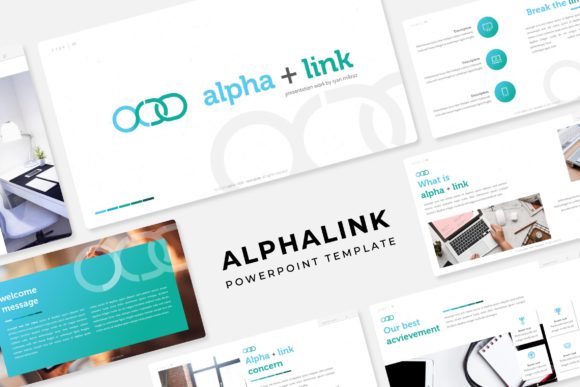
Alphalink Power Point Template: A Complete Presentation Toolkit
Creating a professional presentation can feel daunting. You want your slides to look polished and engaging, but designing every element from scratch consumes precious time. The Alphalink Power Point Template solves this by offering a complete, ready-to-use system. Think of it not as a single template, but as a flexible toolkit with 150 total slides organized into five distinct color themes. Each theme provides 30 carefully crafted slides, giving you a substantial foundation for any project.
Why a Multipurpose Template Matters
Whether you're a beginner building your first client pitch or a seasoned educator preparing a course module, starting with a blank slide is inefficient. The Alphalink template provides structure and visual consistency from the outset. Its core value lies in its comprehensive scope. With five premade color variations, you can instantly match the tone of your brand or topic—from corporate blues to vibrant oranges. This variety means one purchase serves multiple needs across different projects or departments.
The template supports common presentation goals: communicating ideas clearly, building credibility, and saving time. It addresses the need for a design that looks custom-made without requiring graphic design skills. For entrepreneurs and freelancers, this is crucial. A well-designed presentation can influence client decisions, while educators and marketers use visuals to enhance comprehension and retention.
Key Features Designed for Practical Use
Beyond the sheer number of slides, the Alphalink template includes specific features that streamline the editing process. Everything is built on master slides. This technical foundation ensures uniformity; changes to fonts or colors on the master slide automatically update across your presentation, maintaining a clean, consistent look.
Handcrafted Infographics and Flexible Layouts
Data and processes often need visual explanation. The template includes a suite of handcrafted infographics within PowerPoint itself. These are not static images but editable shapes and text boxes, allowing you to tailor charts, diagrams, and timelines to your specific data. Similarly, the dedicated gallery and portfolio slides offer elegant ways to showcase work, products, or team members without complex formatting.
For content organization, section break slides are provided. These act as visual chapter markers within a longer presentation, helping you segment topics clearly for your audience—a simple yet effective tool for improving flow.
Easy Customization with Drag-and-Drop
A standout feature for casual users and professionals alike is the resizable and editable graphic picture placeholder. These are designated areas on slides where you can drag and drop your own images. The placeholder automatically frames and fits your picture, maintaining the slide's layout integrity. This eliminates the frustrating pixel-adjusting often required when inserting photos, making the process genuinely intuitive.
All illustrations are pixel-perfect, meaning they are crisp and sharp at any standard size, avoiding blurry or low-quality graphics that can undermine a professional look. The entire package is delivered as 5 PPTX files for standard layout and 5 PPTX files for widescreen format, ensuring compatibility with different display setups.
Realistic Applications Across Fields
How might you use the Alphalink Power Point Template in practice? Consider a small business owner launching a new service. They could use the blue theme for a formal investor deck, utilizing the infographic slides to explain their growth model and the portfolio slides to display case studies. A blogger creating a webinar on productivity could choose a brighter theme, using section breaks to divide the talk into key habits and employing the easy picture placeholders to add relevant motivational imagery.
For an educator, the template's structure is a boon. Building a semester-long lecture series becomes more about filling in curated content than designing slides. The master slide functionality ensures all weekly modules share the same readable font and color scheme, creating a cohesive learning experience. Freelancers, such as designers or consultants, can quickly adapt different color themes for different clients, making each presentation feel bespoke while working from a single, familiar system.
Important Considerations Before Use
While the Alphalink template is designed for ease, it’s helpful to understand a few specifics. The package includes a Readme First file. This is your starting point, guiding you through the files and how to best use the master slides. All fonts used are free, and a download link is included, ensuring you can exactly match the typography shown.
A critical note: all photographs or pictures shown in previews or demos are for illustration only and are not included in the download. You supply your own images, which is standard for templates to keep file sizes manageable and to avoid licensing issues. This means you’ll need your own photo library or stock images, but the drag-drop placeholders make integrating them straightforward.
Assessing Your Needs
Is this template right for you? If you frequently create presentations and want to elevate their visual quality without starting from zero each time, it offers significant value. Its breadth—150 slides across 5 colors—means it’s suited for users who need variety or who work on diverse topics. However, if you require extremely niche, industry-specific slide layouts (like complex engineering schematics), you may need to supplement this general toolkit.
The template works within standard PowerPoint, so no special software is needed. Its editable nature means your creativity isn’t limited; you can modify any element. For beginners, the predefined structure provides confidence. For professionals, the time saved on design allows deeper focus on content and messaging.
Ultimately, the Alphalink Power Point Template acts as a robust foundation. It turns the often tedious task of slide design into a more efficient, creative process. By providing a wide array of professional slides that are easy to customize, it empowers users across fields to communicate their ideas with clarity and visual impact.